
Landscape
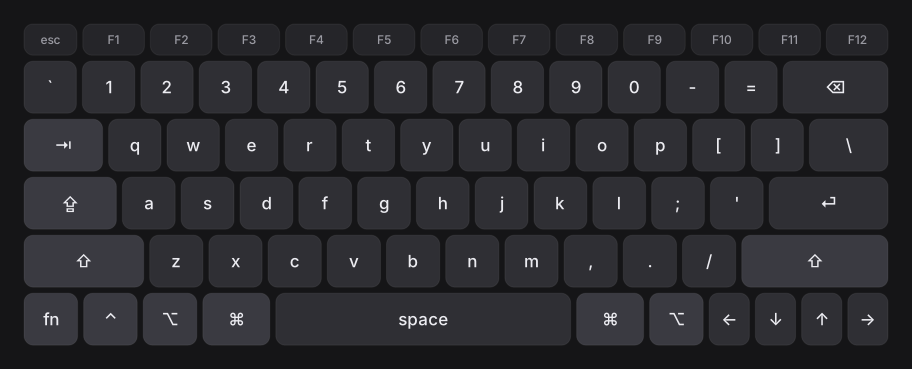
75% layout, with a function row and arrow keys
macOS 14 or later · Windows 10 or later · Intel and Apple silicon
Get the iPhone / iPad version on the App Store→ Or get the Mac version (PKG, ~2 MB)→
Trackpad
Tap a gesture under the stage to see it. Movement gets acceleration and inertia; dragging stays strictly 1:1 — not a toy that can swipe twice.
The stage cycles through these six. The other three skip the stage: a two-finger tap is right click, a three-finger tap is Look Up, and three fingers up or down open Mission Control and App Exposé.
Keyboard
Landscape runs a 75% layout at 15 units per row, portrait runs ten columns, and the phone keyboard has three layers. Hide a row and the rest grow to fill it.
75% layout, with a function row and arrow keys
Ten columns, each key 33 × 53 pt
Letters, 123 and #+= in three layers, with esc and arrows kept
Features
A full trackpad and three keyboards, ready the moment you connect. Here is how it connects and what else it handles.
Connection
Direct on your local network
Beyond the basics
The details you notice later
FAQ
No. The Mac side is a menu bar icon that injects keys and pointer events through the Accessibility permission. No system extension, no reboot.
That permission is what lets an app move the cursor and send keystrokes. Without it macOS silently drops the input — it looks like “connected but nothing happens”.
iOS 17 or later on iPhone and iPad, macOS 14 or later on the Mac, and a Windows 10/11 version is coming. Download the Mac app from this page; it is not on the App Store.